What Digital Literacy Skills Really Include
Digital literacy is not just knowing how to use an app. It’s a set of skills that helps students access information online, make sense of what they find, and communicate well in digital spaces. In school, it usually breaks into four parts: healthy technology habits, online safety basics, critical thinking about digital content, and practical digital communication.
This matters because homework, friendships, and future jobs all run through screens. When students can spot unreliable posts, protect their privacy, and write clearly to real audiences, they make better choices with less supervision. Confidence grows when they feel in control of their tools.
Think of it like learning to drive, not just starting the car. Students practice rules of the road, watch for hazards, and choose the right route, including critically engaging with digital information. They also learn when to speak up, when to cite sources, and how to collaborate respectfully.
Build a Multimedia Project With Research, Teamwork, and Better Prompts
Once students understand the “what” of digital literacy, they learn it faster when they’re making something real with it. Multimedia presentations are a natural fit because they ask students to blend research with visuals, audio, and collaborative storytelling into one clear message. As teams gather sources and outline their story, they can use a prompt-based AI image tool to brainstorm and generate custom images that match their topic and tone, then refine those prompts for more consistent results with help from Adobe Firefly's AI art prompt guide. Those student-made visuals can become slide illustrations, subtle backgrounds that reinforce a theme, or storyboard frames that map out what comes next, making the final presentation more engaging and visually cohesive.
Plan → Create → Check → Share → Improve
This rhythm turns “using tech in class” into steady, transferable digital literacy. It keeps students practicing research, communication, and judgment in small cycles so skills stick instead of fading between projects. Studies of PISA results suggest that moderate, purposeful device use for learning can support stronger outcomes.
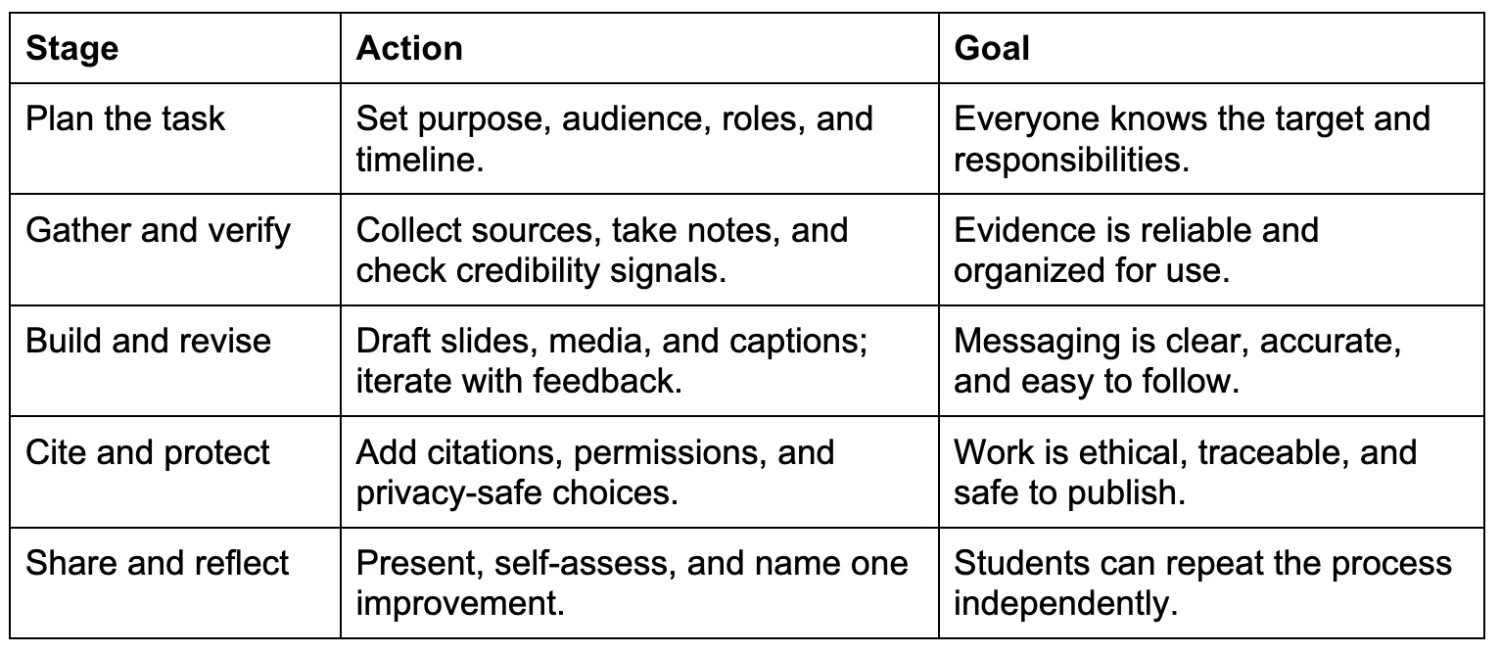
Each stage feeds the next: planning reduces confusion, verification improves quality, and revision strengthens communication. Reflection closes the loop so students carry lessons into the next assignment, not just the next class.
Simple Digital Literacy Habits That Stick
Digital literacy grows fastest when students practice small, reliable behaviors, not just big projects. These habits make online choices more intentional, so confidence builds week after week.
Two-Tab Research Rule
- What it is: Keep one tab for reading and one for note-taking.
- How often: Each research session.
- Why it helps: It reduces copy-paste habits and improves source-based writing.
Credibility Check in 30 Seconds
- What it is: Scan author, date, evidence, and purpose before trusting a page.
- How often: Daily.
- Why it helps: It builds skepticism without cynicism.
Mindful Device Setup
- What it is: Practice customizing your digital world with focus mode and fewer alerts.
- How often: Weekly.
- Why it helps: It supports attention and better follow-through on assignments.
Permission Before Posting
- What it is: Ask consent before sharing photos, names, or group work online.
- How often: Every time you post.
- Why it helps: It strengthens privacy and respectful digital citizenship.
Weekly Safety Micro-Update
- What it is: Refresh passwords and review basic cybersecurity and digital literacy rules.
- How often: Weekly.
- Why it helps: It keeps safe online behavior from slipping.
Building Digital Literacy Confidence Through School-Home Partnership
Kids are growing up in a world where screens are everywhere, but knowing how to use technology well doesn’t happen automatically. The steady path is a shared mindset: practice purposeful, safe, reflective digital habits while schools’ educational technology initiatives give students the tools and structure to learn. When parents and educators reinforce the same expectations, students build real digital confidence, skills that carry from assignments to friendships to future work. Digital literacy is how students stay capable, safe, and motivated in digital learning. Notice one technology skill your student is practicing this week and name it at home, connecting it to what their teachers are building in class. That kind of support strengthens resilience and keeps opportunities open as the digital world keeps changing.